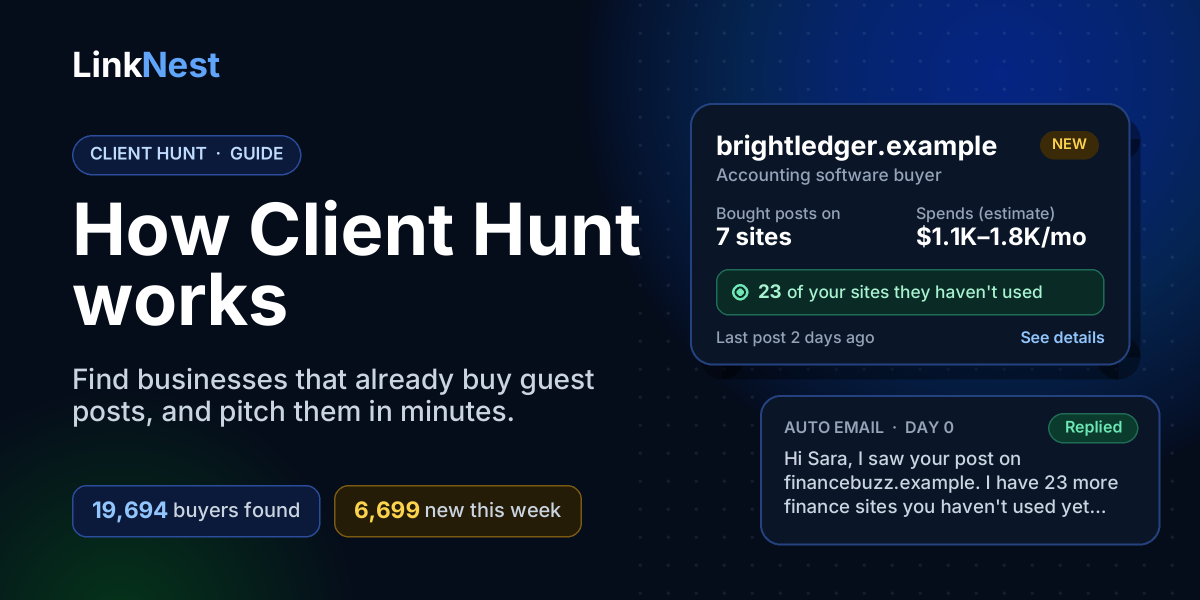
Most link builders don’t have a site problem. They have a buyer problem. You can have 50, 500 or 5,000 sites ready to publish on, and still spend the week pitching businesses that have never paid for a link in their life. Those emails go unanswered because the person reading them was never in the market.
Client Hunt starts from the other end. Instead of guessing who might want a guest post, it finds businesses that bought one recently, matches them to the sites you sell, and writes the pitch for you. This guide explains exactly how it does that, what the numbers on each buyer mean, and how to use it to find guest post buyers who actually reply.
The idea behind Client Hunt in one sentence
Every paid guest post leaves a public trail: a link from the publisher’s article to the business that paid for it. If you read the new posts on enough publisher sites, you can see who is buying right now, how often, on which kinds of sites, and roughly how much they spend.
That is all Client Hunt does at its core. The work is in doing it every day across thousands of sites, cleaning out the noise, and turning raw links into a short list of businesses you can sell to.
What Client Hunt has found so far
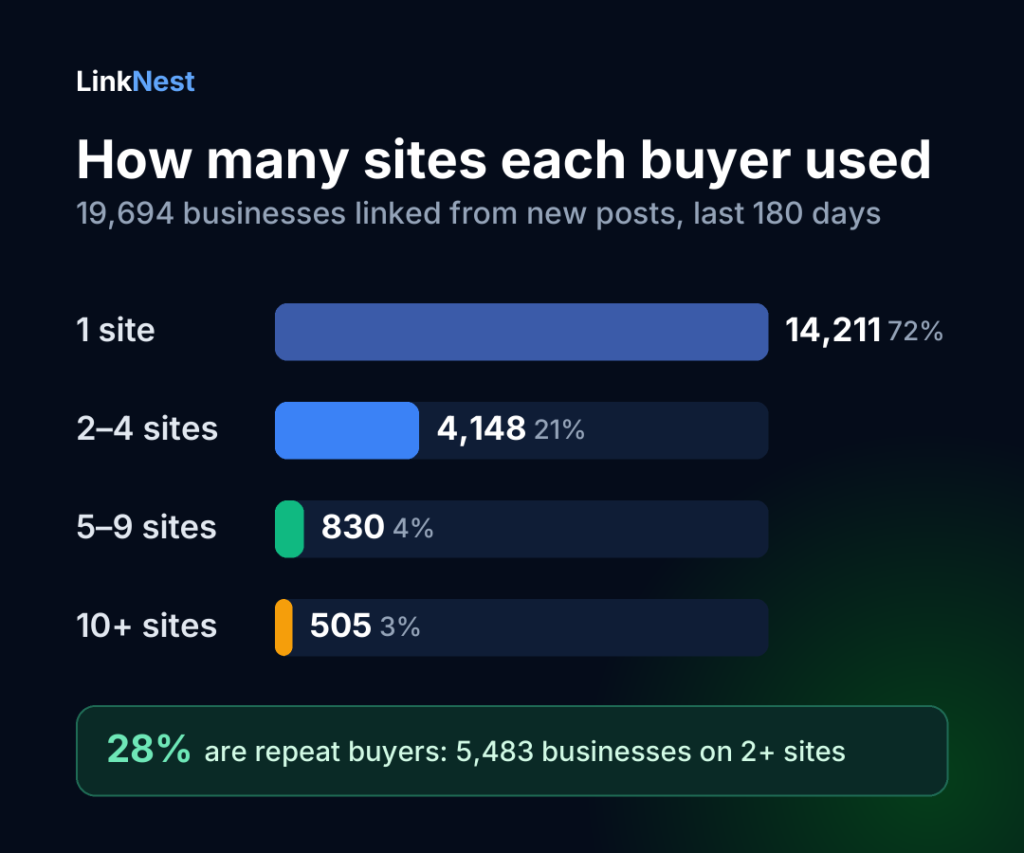
Before the how, here is the scale. These numbers come straight from Client Hunt’s own data in early November 2026, covering posts from the last 180 days.
Three things in this data are worth knowing before you pitch anyone:
- Most buyers are testing. 14,211 businesses (72%) showed up on just one site. A business that bought one post recently is often still deciding where to buy the next ten. That is a good moment to show them more options.
- Repeat buyers are the real prize. 5,483 businesses (28%) were linked from two or more sites, 830 from five to nine sites, and 505 from ten or more. These are businesses with a link building budget and a habit of spending it.
- You can’t find buyers by looking for the “sponsored” tag. Google asks publishers to mark paid links with
rel="sponsored", but only 177 of the 45,447 links we read carried it, about 0.4%. Finding buyers means reading the links themselves.
Here is where those businesses are buying, counted by the topic of the post their link appeared in. A business can appear in more than one niche.
| Niche | Businesses | Links |
|---|---|---|
| Lifestyle | 5,873 | 10,817 |
| Tech | 3,780 | 6,738 |
| Casino & betting | 1,932 | 4,215 |
| Home & garden | 1,798 | 2,643 |
| Business | 1,566 | 2,438 |
| Health | 1,552 | 2,615 |
| Finance | 1,267 | 2,051 |
| Beauty & fashion | 1,073 | 1,427 |
| Gaming | 842 | 2,183 |
| Travel | 687 | 1,064 |
How Client Hunt works, step by step
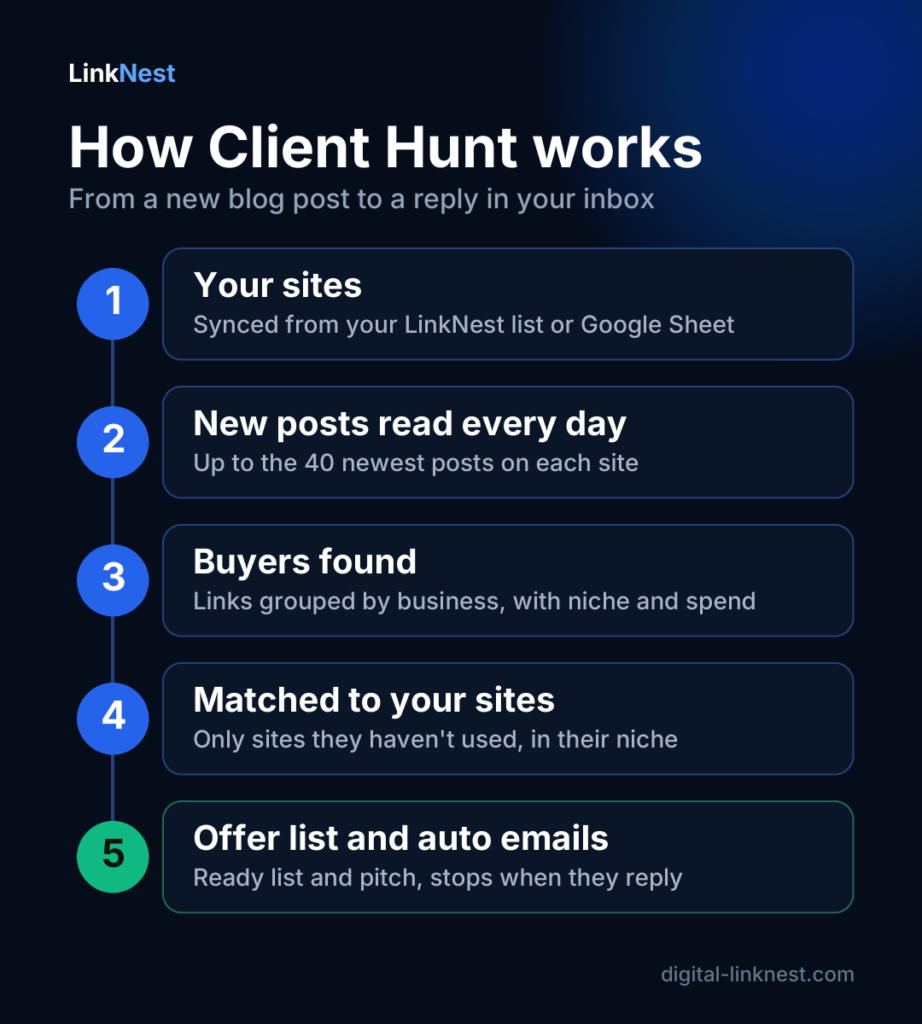
Step 1: Your sites are the starting point
Client Hunt lives inside your LinkNest dashboard. The sites you list on LinkNest, whether you added them by hand or synced them from a Google Sheet, are copied into Client Hunt automatically. You don’t upload anything twice.
Your sites matter in two ways. They are added to the pool of publisher sites that Client Hunt reads, and they are what every buyer gets matched against. The more accurate your niches, DR and prices are in your sheet, the better your matches and spend estimates will be.
Step 2: New posts are read every day
Most publisher sites have an RSS feed that lists their latest posts with the full text. Client Hunt finds each site’s feed and reads up to the 40 newest posts in it. Sites of Pro users are read every 24 hours, sites of free users every 7 days, and sites of people who haven’t logged in for a month drop to once a month until they come back.
In every post it looks at the outgoing links and throws away everything that isn’t a business that could have paid for the placement:
- links back to the publisher’s own site, and links to images, PDFs and other files
- social networks, Google, Amazon, marketplaces and big platforms
- news sites, Wikipedia, dictionaries, research databases and medical journals that writers cite as sources
- affiliate networks and link shorteners
- government, education and military sites
What’s left is grouped by business, so shop.brand.com and www.brand.com both count as brand.com. For each link, Client Hunt keeps the publisher site, the post title, the post date, the link text and whether the link was marked sponsored.
Step 3: Links become buyer profiles
Each business gets a card in your Buyers list. Here is what one looks like, with example data:
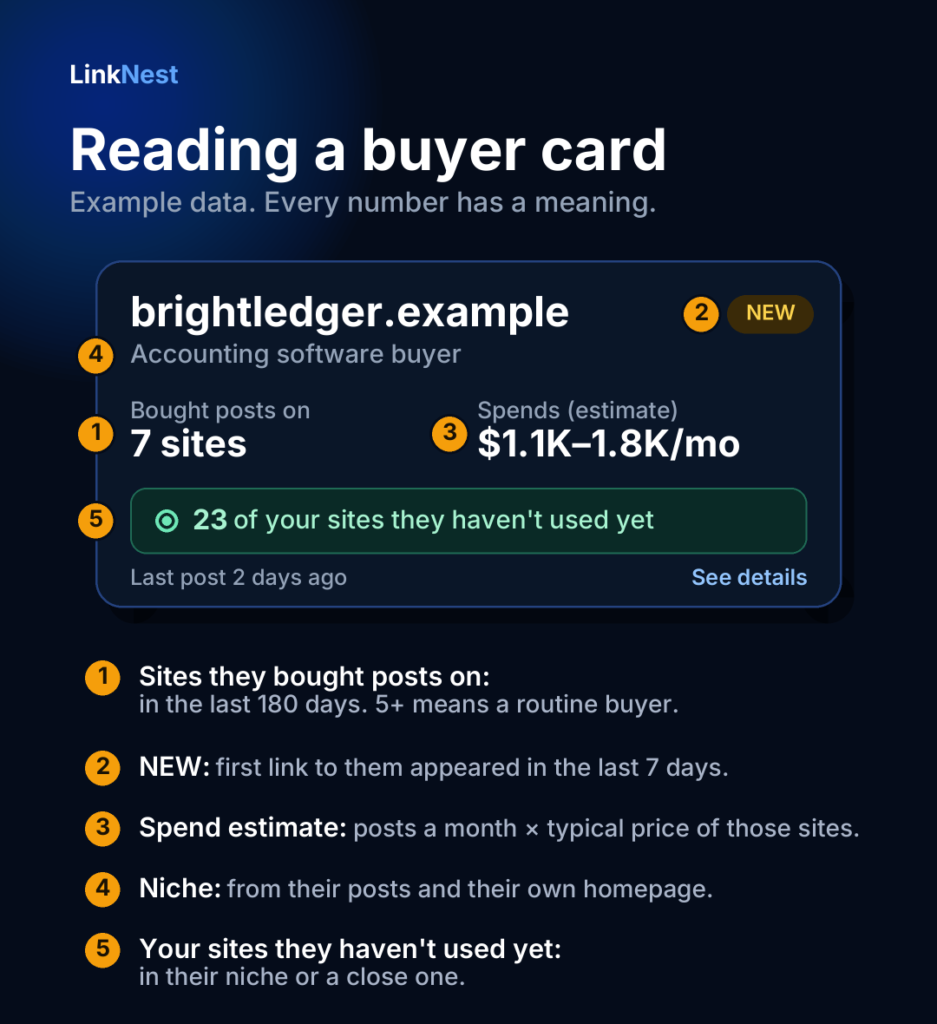
What each part means:
- Bought posts on: how many different publisher sites linked to them in the last 180 days. One site means they’re testing. Five or more means they buy links as a routine.
- NEW: the first link to this business appeared in the last 7 days. New buyers haven’t been flooded with offers yet.
- AGENCY: their own website describes them as an SEO, link building or marketing agency. Agencies buy for many clients, so pitch them volume and wholesale rates rather than a single post.
- Spends (estimate): how many posts they bought in the last 30 days (or a third of the last 90 days if the last month was quiet), multiplied by the average price of the sites they bought on. Prices come from freelancers’ sheets. When a site has no price, a typical price for its DR is used: about $80 for DR 10+, $150 for DR 30+, $250 for DR 50+ and $400 for DR 70+. The result is shown as a range, 25% either side, because it is an estimate, not an invoice.
- The niche (like “Accounting software buyer”): worked out from the link text, the post titles, the post URLs, the business name and, for non-agencies, the title and description of their own homepage. A business selling software gets a software label even if it bought a post on a lifestyle blog.
Gambling is handled strictly. Many betting brands only reveal what they are in their name or their homepage, often in Indonesian or Hindi terms, so Client Hunt checks for those words too. Casino and betting businesses are only ever matched with casino sites, because general sites rarely accept them and a wrong offer wastes everyone’s time.
Step 4: Every buyer is matched to your sites
The green line on each card, “23 of your sites they haven’t used yet”, is the most useful number in the list. It’s calculated for you specifically:
- Your sites in the buyer’s own niche come first.
- Then sites in close niches (finance and business, health and beauty, travel and food) and your multi-niche sites.
- Sites in unrelated niches are never suggested.
- Any site where the buyer already has a link is removed. Pitching a business a site it already bought on is the fastest way to look like you didn’t do your homework.
The default order, “Best match”, puts active buyers you can actually sell to at the top and pushes businesses you have already emailed, or have no fitting sites for, to the bottom.
Step 5: Contact details are found for you
When you open a buyer, Client Hunt visits their homepage and contact pages and collects the email addresses published there. It checks that the domain can actually receive email, looks for their LinkedIn company page, and saves the result for 30 days. So far it has found a public email for 2,021 of the 3,826 businesses it has checked, about 53%. When it can’t find one, you can type in an address you found yourself.
Step 6: A ready offer list in one tap
Tap “Make a list” and Client Hunt builds a private page with up to 50 of your matching sites, best fit first. You decide how prices appear: hidden (they ask you), your sheet price, or your price plus a markup you set. The buyer can tick the sites they want and send an order with their name, email and a note. You get the order by email with their address as the reply-to, so you can answer straight away.
Client Hunt also counts how often the list is opened. A buyer who opens your list two or more times without replying is showing interest. Pro users see them flagged as “Hot right now” on the Sending screen, so they can follow up while it’s warm.
Step 7: The pitch is written for that buyer
Generic pitches fail because they could have been sent to anyone. Client Hunt fills its template with details only you could know from the data: the site they bought on, the title of their post, how many of your sites fit, the niche, and the link to their list. The default first email reads like this:
Hi Sara,
I saw your post on financebuzz.example (“5 Ways Small Firms Cut Bookkeeping Time”).
I have 23 more finance sites where you don’t have a link yet. Here’s the list: [your list link]
Happy to give a better rate for 5+ posts.
It’s short on purpose. It proves you looked, it offers something specific, and it gives them one easy thing to click. You can rewrite every word of it, and of the follow-ups, in your settings.
Step 8: Auto emails that stop when they reply
You can copy the pitch and send it yourself, or let Client Hunt send it. Emails go from your own mailbox (Gmail, Outlook, Zoho or your own domain, using an app password), so replies land in your normal inbox and the conversation is yours. LinkNest never sends sales emails on your behalf from its own servers.
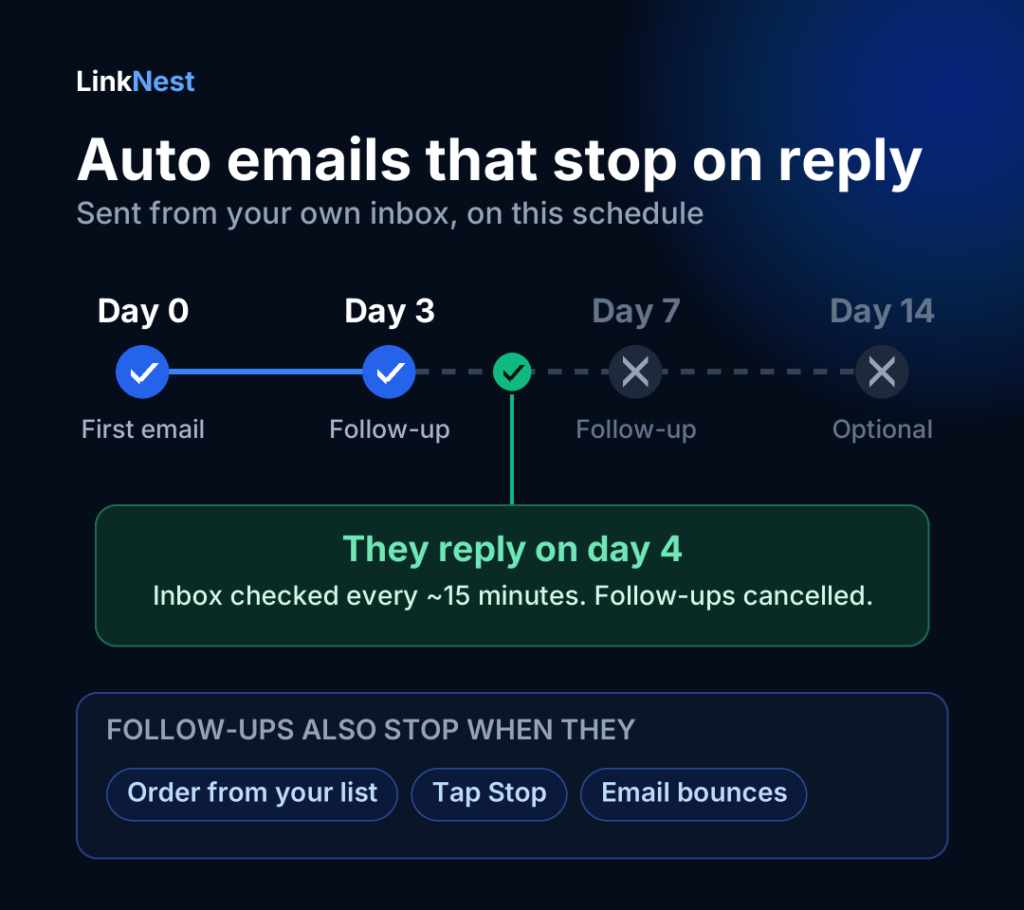
- Schedule: the first email on day 0, follow-ups on day 3 and day 7, and an optional fourth on day 14. You can skip weekends.
- Warm-up: a new mailbox starts at 30 emails a day and grows by 5 each week, up to 50, because sudden volume is what gets inboxes flagged.
- Stops on reply: about every 15 minutes Client Hunt checks your inbox for mail from the buyer’s address, or from anyone at their company domain if they use a business email. Out-of-office and other automatic replies are ignored. The moment a real reply arrives, every follow-up to that buyer is cancelled.
- Stops on order, unsubscribe and bounce: follow-ups also stop if the buyer orders from your list, taps the stop link that’s included in every email, or the address bounces.
There are guardrails to keep your inbox safe. Every email carries your business address and a one-click way to stop, and sending pauses automatically if too many people tap stop or too many emails bounce. That protects your domain’s reputation as much as anyone’s.
A walkthrough: from buyer to reply
Here’s how a typical lead flows through Client Hunt. The business is an example; the steps are exactly what you’d do.
- You open the Buyers tab and tap “Show only new”. An accounting software company appears: first link 2 days ago, posts on 7 sites, estimated spend $1.1K–1.8K a month, 23 of your finance and business sites unused.
- You open the card. Client Hunt shows the 7 posts they bought, with titles and dates, and has already found a marketing email on their contact page.
- You tap “Make a list”. A private page with your 23 matching sites is ready, prices shown with your 20% markup.
- You tap “Add to auto emails”. The first email goes out within minutes, mentioning the post they bought last week.
- Two days later they open the list twice and reply asking about bulk pricing. Client Hunt marks them “Replied” and cancels the follow-ups. You take it from there in your inbox.
Free vs Pro
You can use Client Hunt free for as long as you like. Pro removes the limits and adds the automation.
| Feature | Free | Pro |
|---|---|---|
| Buyers you can see | Top 20 in each list | All of them, 50 at a time |
| Buyer details (email, matches, offer list) | 5 a day | No limit |
| Sort by budget, newest or most sites | No | Yes |
| Ready offer list and written pitch | Yes | Yes |
| Auto emails from your inbox | 5 a day, first email only | Up to 50 a day with warm-up |
| Follow-ups that stop on reply | No | Yes |
| Hot lead alerts | No | Yes |
| Look up any domain | No | Yes |
| Your sites re-read | Every 7 days | Every day |
How to get more replies from Client Hunt leads
- Be fast. A buyer is most open to new sites in the days after a purchase. Check “New this week” daily and pitch the best fits first.
- Lead with relevance, not volume. Ten buyers with 15+ unused matching sites beat a hundred with two. Skip buyers you can’t serve well.
- Mention their post. The single line about the post they bought is what makes the email read as research instead of spam. Keep it.
- Make pricing easy. Either show prices on the list or offer a clear bundle (“5 posts for $X”). Buyers who have to ask for prices often don’t.
- Treat agencies differently. An agency buying on 30 sites wants a reliable supplier with consistent turnaround, not a one-off deal. Pitch your range and your speed.
- Protect your inbox. Use a mailbox you also use for real conversations, keep the warm-up, and if you send from your own domain make sure SPF and DKIM are set up with your email provider.
If you are still building your client base from scratch, our guide on how to get SEO clients in 2026 covers the other channels that work alongside outreach, and how to find guest posting sites explains how to vet the sites you add to your list.
What Client Hunt doesn’t do
It’s worth being clear about the limits, so you use the data the right way:
- Not every link is a paid post. Writers also link to tools and businesses they genuinely recommend. That’s why the number of sites and how recently they appeared matter: a business linked from seven publisher sites in a month is very likely buying.
- Spend is an estimate. It’s built from public posts and typical prices, not from anyone’s invoices.
- Replies from a different address can be missed. If someone answers from a personal email instead of their company one, open the buyer and tap “Stop emailing them” so no follow-up goes out.
- Other freelancers see the same buyers. The buyer pool is shared. What wins the deal is speed, a relevant list and a pitch that shows you looked.
Frequently asked questions
Where does the buyer data come from?
Only from public posts on publisher sites, read through their RSS feeds. Client Hunt doesn’t buy lists, scrape private data or use anyone’s order history.
Is it allowed to email these businesses?
Rules depend on where you and the recipient are. In the US, the CAN-SPAM Act requires commercial emails to be honest, include a valid postal address and offer a working way to opt out. The EU and UK have stricter rules. Client Hunt adds your address and a one-click stop link to every email and honours stops automatically, but you’re responsible for following the laws that apply to you. This isn’t legal advice.
Will my emails go to spam?
Sending from your own mailbox, at a gradually rising daily limit, to businesses that actually buy what you sell is about as safe as outreach gets. Short, personal emails with one link do far better than long templates with many. Sending pauses on its own if too many people opt out, which is an early warning to tighten your targeting.
How many sites do I need to start?
One. The buyer list comes from all the publisher sites Client Hunt reads, not only yours, so it fills up the moment your first site is added. The number of matching sites on each card grows as you add more.
Can I use Client Hunt for free?
Yes. A free LinkNest account shows the top 20 buyers in each list, opens 5 buyer details a day with ready offer lists and pitches, and sends up to 5 first emails a day from your inbox. Pro is there when you want all buyers and automatic follow-ups.
Start finding guest post buyers today
The fastest way to understand Client Hunt is to see your own buyers. Create your free LinkNest profile, connect your Google Sheet or add your sites, and open the Client Hunt tab. Your first buyers, their spend estimates and your matching sites are waiting there. While you’re at it, check the sites in your list with our free DR checker so your prices and matches are as accurate as they can be.